Content
Our logo is the best way for our customers to distinguish us in a saturated market. It’s a promise of quality, consistency and reliability. It is therefore of great importance that our logo is presented correctly with each implementation.

Symbol

Logotype
The logo is used on all our communication forms and ensures that our audience knows who we are. The symbol is to be used as social media avatar or in situations where available space is limited.

Y = 25% symbol height (x)
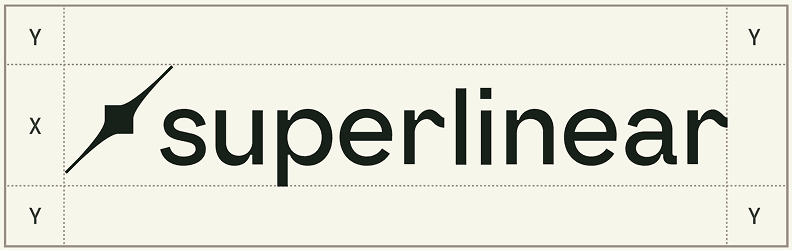
Y = 50% logotype height (x)
To ensure optimal legibility and brand clarity in all media, an area around the
logo called “clear space“ should be kept free from any elements. The clear space is determined as a fraction of the height of the logo and symbol.
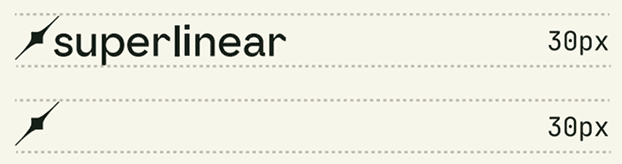
For clarity across digital and print applications our logo should never be reproduced at any size below the adjacent guidance.

Square avatar - light

Circle avatar - light

Square avatar - dark

Circle avatar - dark
When used as social media avatars, the logo should be used with the right amount of clear space on all sides. We have developed four approved avatar images found here on this page. They are each approved for both circular and square avatars shapes of all sizes.


The colors we have chosen for our brand are an important factor in our positioning and brand recognition. It is vital that our colors are used and combined correctly.
Maintaining consistency in color usage is crucial for delivering a unified brand experience. Your brand should always be represented using one of the colors outlined on this page. Primary colors should be applied to key elements such as the logo, body copy, and backgrounds to ensure a strong, recognizable identity.
Ink
HEX: #1A211B RGB: 26/33/27 CMYK: 78/64/73/78
2B
HEX: #303B36 RGB: 48/59/54 CMYK: 37/16/30/83
Mint
HEX: #83EBBD RGB: 131/235/189 CMYK: 49/0/38/0
Canvas 01
HEX: #FFFEF8 RGB: 255/254/248 CMYK: 2/0/4/0
Canvas 02
HEX: #F7F6EB RGB: 247/246/235 CMYK: 4/0/11/0
Canvas 03
HEX: #E6E5D5 RGB: 230/229/213 CMYK: 13/8/18/0
Grey 01
HEX: #BFBEAF RGB: 191/190/175 CMYK: 30/22/31/0
Grey 02
HEX: #9A9189 RGB: 154/145/137 CMYK: 45/40/42/5
We understand that a single color may not suit every situation. While the brand logo should always be presented in the primary colors, this extended palette offers flexibility for other applications like layout accents or in brand elements such as superlines, graphics, or information tabs, adding depth and variety to the brand’s visual identity.
Lime
HEX: #C9EF5 E RGB: 201/239/9 4 CMYK: 31/0/74/0
Yellow
HEX: #F7EE52 RGB: 247/238/82 CMYK: 9/0/75/0
Orange
HEX: #F28827 RGB: 242/136/39 CMYK: 0/57/89/0
Magenta
HEX: #F16688 RGB: 241/102/136 CMYK: 0/73/22/0
Lila
HEX: #CE71FF RGB: 206/113/255 CMYK: 40/60/0/0
Blue
HEX: #6E8CFF RGB: 110/140/255 CMYK: 61/47/0/0
Aqua
HEX: #84E1FF RGB: 132/225/255 CMYK: 46/0/0/0
These are general guidelines for using colors in website design, but also applyt to other designed media. However, this list is neither exhaustive nor restrictive and may be expanded as seen fit.
Home page
For the homepage, we chose a more intimate and immersive visual direction, using darker tones to create a warm, in-house feel with a strong human touch. A combination of 2B and Ink tones supports visual hierarchy and depth, while Mint and Grey outlines are used as subtle accent details to highlight key elements.
2B
HEX: #303B36 RGB: 48/59/54 CMYK: 37/16/30/83
Ink
HEX: #1A211B RGB: 26/33/27 CMYK: 78/64/73/78
Detail pages
For detail pages, we shift to a lighter palette using Canvas 01–03 to create a clear, airy reading experience. The focus is on functional clarity and readability for content-heavy screens like news articles, product information, and company pages.
Accents remain consistently applied in Mint to maintain brand recognition across environments.
Canvas 01
HEX: #FFFEF8 RGB: 255/254/248 CMYK: 2/0/4/0
Canvas 02
HEX: #F7F6EB RGB: 247/246/235 CMYK: 4/0/11/0
Our typography supports a refined, trustworthy digital presence with a balance between editorial character and clarity.
This section discusses approved fonts, how we use typography to communicate clearly, and some helpful user tips. Any font not referenced in this chapter is considered unusable.
Newsreader
Our typography supports a refined, trustworthy digital presence with a balance between editorial character and clarity.
Newsreader is our primary display typeface. It is used for hero text, headlines, quotes, and all headings above body copy. Its editorial tone adds sophistication while remaining highly readable. (In scenarios where we absolutely cannot use the typeface it can be substituted with the web-safe EB Garamond)
H1
Newsreader, Regular 64pt/150%
H2
Newsreader, Regular 56pt/150%
H4
Newsreader, Regular 32pt/125%
Archivo Narrow
Archivo Narrow is used as an accent typeface for subtitles and secondary headings where additional contrast or emphasis is needed.
H3
Archivo Narrow, Regular 40pt/150%
DM Sans
DM Sans is our primary body text typeface, selected for its clarity and comfort in longer reading contexts.
Body
DM Sans, Regular 20pt/150%
Body small
DM Sans, Regular 16pt/150%
JetBrains Mono
JetBrains Mono is reserved for captions, dividers, and technical or functional text, providing clear visual distinction.
Caption
JetBrains Mono, Regular 16pt/150%
This section is really where the magic happens. Give a variety of parts and pieces
at different levels of the design system to arm them with the right assets.
Glass Effect
Our identity incorporates two types of glass effects: for a soft, diffused look and for a
dynamic, light-bending effect. The frosted glass effect is ideal for creating a “clear area” within a busy image, serving as a subtle background for text or in tandem with superlines. The refracted glass effect enhances still photos by infusing them with energy and dynamism. It should not be combined with superlines.

Example glass effect (right)
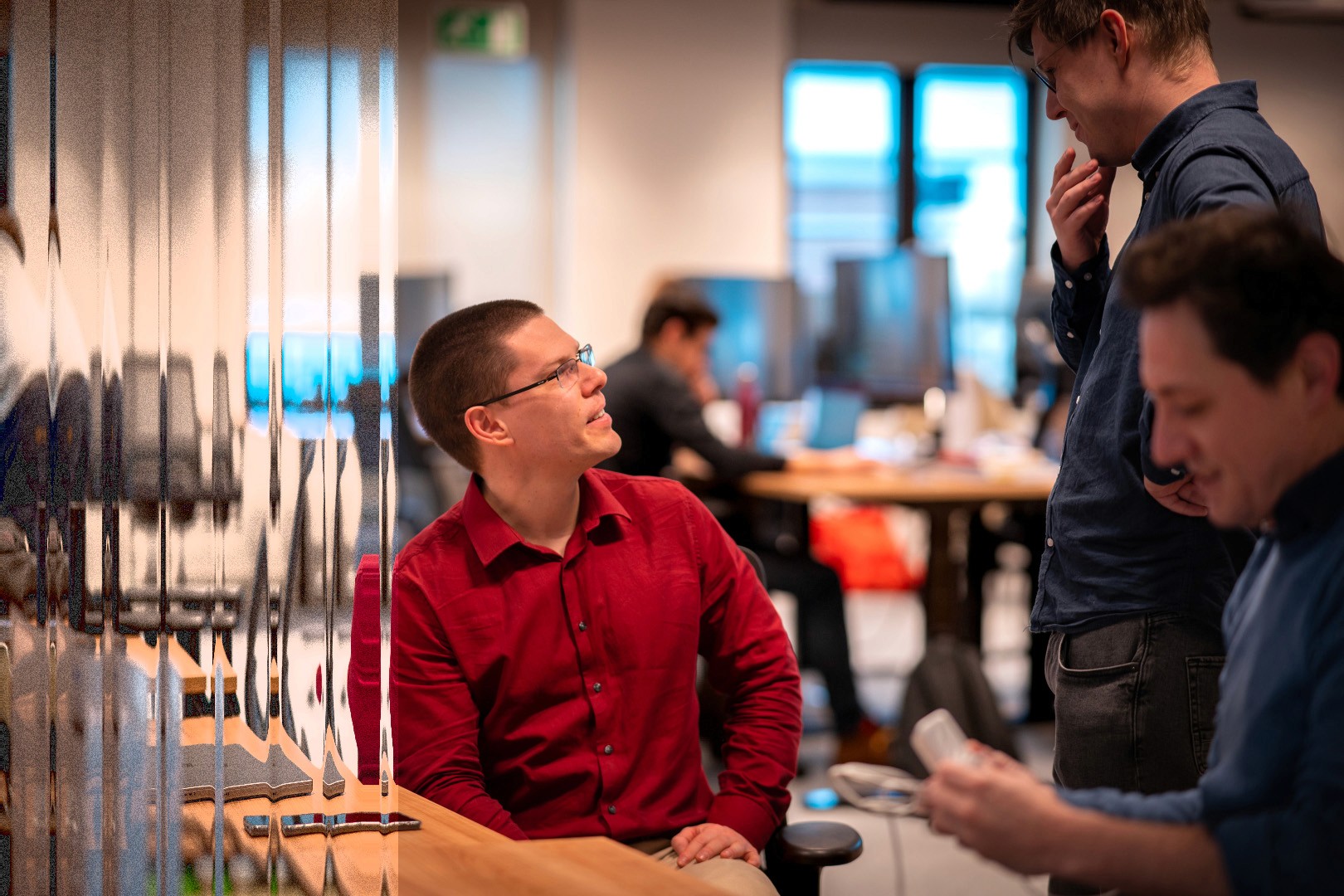
Example glass effect (left)
Refracted Glass Effect
The easiest way to recreate the refracted glass effect is with Photoshop. We’ve selected a simple tutorial and provided a Distortion Map file (part of our Asset Pack) to help you achieve the look effortlessly.
Note: The effect result is dependent on the image section that is transformed, so
adding film leaks, chromatic aberration or playing with the brightness and contrast of said section gives a more visually pleasing effect.

Example glass effect (right)
Icons
Overview of icons (.svg) used on the website
Search
Open hyperlink
Open drawer
Scroll down
Our typography supports a refined, trustworthy digital presence with a balance between editorial character and clarity.
This section discusses approved fonts, how we use typography to communicate clearly, and some helpful user tips. Any font not referenced in this chapter is considered unusable.
Every interaction with our stakeholders – in print, in person or through our website – is an expression of our brand, and thus contributes to how our brand is perceived. To effectively convey our brand through these interactions, we must make sure that we speak with one voice in every communication: The Superlinear Voice.
Voice = expression of our personality & values
Tone = the feeling and emotion of our words
Voice is constant (who we are). Tone adapts (how we sound in context).
Context matters. Use the guidelines below, but trust yourself and your expertise. Take into account the audience, medium and purpose of your communication. Keep it simple.
The Hero (strategic, ambitious): elevate our mission, the ‘why’
The hero makes the world better, by being the best.
They strive to triumph & change the world by promoting accomplishment & mastery.
They’re the champions of courage, inspiring us all to be a little braver.
Attributes: honorable, bold, discipled, focused, courageous, goal-oriented, determined encouraging, competitive, positive about the future
Our European economic mission: We are not here to maintain the status quo. We are here to reverse the decline. We build the systems that will secure Europe's future prosperity. We play for high stakes: raising GDP by 1% isn't a KPI, it’s a necessity. We do not settle for incrementalism. We engineer systemic change (and superlinear gains!).
Do
Dare to inspire, to encourage innovation. Use language that conveys our mission (e.g., "mission," "prosperity," "system-level," "future-proof").
Don’t say ‘why me’, say ’try me’
Powerful vision and convincing wording (e.g. “we believe...”, “in our experience…”, “we should”, “we think”,”we recommend”, “our best bet is…”)
Positive phrasing (e.g. “help”, “solve”, …)
Scope the ambition. We speak with bold clarity about our goal (e.g., raising EU GDP by 1%).
We use data, macroeconomic references, and system-level thinking to inspire confidence. (first principles)
Avoid
Untamed arrogance
Indecisiveness, insecurity, being apologetic (e.g. “try to”, “unsure”, “maybe”, ...)
Vague benevolence (don’t just say “help people”, say “empower industries”)
Overpromising
The Sage (grounded, trustworthy, human, expert)
Combination of an enterprise positioning and a tech positioning.
We are knowledgeable experts in our field. Thought leaders. We deliver high-end work to our clients. We emphasize rigor, partnerships, and financial stability without hype.
We are a trusted voice because we are credible, reliable and intimate.
We are credible through real-world examples/cases and institutional backing.
We are reliable because we deliver as promised
We build intimacy through strong client relationships
We keep a calm and factual tone. (first principles)
We are confident in ourselves and our expertise. We do not shout (quiet confidence, loud impact).
We do not overpromise. We ground our expertise in accepted science and research.
We acknowledge complexity and risk at mission-critical companies with calm authority. We navigate the critical path. What can we implement tomorrow?
We focus on measurable impact.
Our people are the center of our knowledge. The teams behind the work are crucial. We take moments to pause, reflect, and acknowledge people and partnerships. We know our clients, the people. We work in their environments.
Do
Encourage people to think
Go to the bottom of things
Be assured, be a guide: provide the required expertise and information (e.g. “we know this because…”, “in our experience...”, “research shows…”)
Show the path (e.g. “the next steps should…”, “if you aim to…, you should…”)
Be factual
Avoid
Oversimplifying (e.g. “no need to go into the details”, “it just is”, “in general”) and overexplaining
This is a complex balance to strike
Adapt to your audience
Talking down
Assuming
Inaccuracy
The Maverick (challenger)
The challenger on the rebellious side (It is not over for Europe yet. We can still change things! We are rebelling against decline.). High-end, but high-velocity. We value output over optics.
We are challengers
We are honest and unafraid. We do not care much for the way things have always been done. We respect tradition, but we respect results more. If a convention blocks progress, we dismantle it.
We are not just visionaries with big dreams.
We deliver excellence by always being grounded in reality and in the realm of what is possible.
Do
Dare to speak your mind and challenge (e.g. “we must ask ourselves…”, “it’s important to think about…”, “is it really what we want to achieve?”, “we could do better by...”, “we think”)
Dare to go against the status quo (e.g. “contrary to popular belief”)
Be on-top of your semantics (e.g. “new”, “cutting-edge”, “innovative”)
Avoid
Being overly confrontational (never give the feeling to our clients we know their challenges better than they do)
Challenging and going against the grain just for the sake of it
Settling (“so be it”, “unavoidable”)